Showing posts with label security. Show all posts

Saturday, December 5, 2009

You Are What You Search: Part 1

As the web continues to evolve, it is becoming more and more common for search tools to offer a personalized experience to the end user. In my next few posts, I'd like to explore some of the emerging trends that are destined to impact in the ways we explore on the World Wide Web.

What's the Motivation?
A few years ago, I was intrigued by the introduction of A9.com, a search engine hosted by Amazon, that promised to save a history of anyone's searches. My initial thought was that such information might be useful in an archeological sense, allowing future generations to see what held our interest at a given time. Dose of Reality: A9 search data was collated with each user's Amazon account.

A-9 has since moved on to new search strategies, including the acquisition of SnapTell, a mobile app that identifies CDs, books, DVDs, and videogames based on cover photos. Dose of Reality: Amazon sells CDs, books, DVDs and videogames.

In Whose Best Interest?

It's now been confirmed by SearchEngineLand, that Google has been personalizing search results for me, based on my past searches and click-throughs, but my search engine of choice actually knows much more about me than that. Consider the data that Google has collected through your use of Google Apps by visiting your personal Google Dashboard.


Although the potential for archived search histories was known to me, it was a bit of an awakening today, to come across my personal Google Web History. If you have a Google account, you've been presented with Terms of Service, and have granted permission for Google to use what you submit, post or display (11.1). If you're concerned about the security of this data, the Google Privacy Centre might allay your fears.

What does the Future Hold?
Whether or not Amazon and Google follow parallel or intersecting paths, these two giants play key roles in Epic 2015 an visionary piece (now almost 5 years old) that extrapolates current trends.


Google and Amazon each offer some terrific 'Free' tools, but maybe it's high time we consder the price we're really paying?

Monday, January 19, 2009

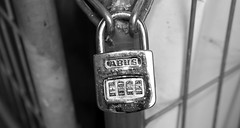
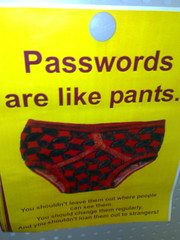
How Secure is Your Online Identity?

Do you use the same password(s) over and over?
Do you record your site access details on a paper list?
Do you regularly use simple to remember keywords?
Is your PIN number the same as your birthday or address?
Do you share your TwitterID and password with 'fun' sites?


If you're like most people, you likely use a few key userids and passwords, making it easy to navigate the many sites and services for which you've registered. Given this common practice, have you ever considered how secure your personal identity really is?

Check the security of your passwords?

Tip #1 Use many passwords.

While it may not be super convenient to keep track of a number of userids and/or passwords, the inconvenience is nothing compared to the task of recovering from identity theft. When registering for an online service, be sure to use an authentic email address so that the site can forward your login details. Your email account provides backup should you ever need to search for a forgotten password, or to request a new password.

Tip #2 Remember your passwords.

If you visit numerous Web 2.0 sites, I recommend saving your passwords in a secure database. You can create your own password protected file, or you can use a tool designed for this purpose. Tools I've used on my Mac and iPhone include 'Wallet', and '1 Password', but there are other tools you might consider, including free ones like Keepass. Each of these tools provides access to my online registration details but you'd need to know the master password in order to gain access to the data. Don't forget to backup this file on more than one drive!

Tip #3 Use strong passwords.

The use of your favourite hobby; your birthday; a child's name; or something easy to type, may make it easy for you to recall your password, but it also makes it relatively easy for an identity thief to crack your code. Instead, use unique codes that cannot be found in a dictionary. Include letters, numbers, and symbols, and ensure that the code has at least 8 characters. (Some experts recommend that using up to 14 characters is the best way to be secure.)

Consider developing passwords from memorable phrases:
"My husband never helps with washing the dishes; Thank goodness we have a dishwasher!" which might become: mhnhwwtd;tgwhad!.

Playing around with the capitalization is also recommended:
"I love when my 5 year old asks for money, especially on his birthday", which could translate to: IlwM5yoafM,eoHb

Tip #4 Change your passwords.

For highly sensitive logins (financial accounts; remote computer access; web memberships...), you should periodically update your passwords. Like changing the battery in your smoke alarm, you may never need such security, but if there is ever a breach, your pre-planning will significantly minimize your recovery time.

Photo Credit: Richard Parmiter and binaryCoco

Thursday, February 21, 2008

My Virtual Health

Even as flash drives with increasing capacities are becoming ubiquitous, it's obvious to me that files, photos, contacts and even ideas are gravitating more and more to web servers in lieu of local hard disk drives. Is a remote computer the best place to store our personal information?

When it comes to photos and videos, more and more folks seem pretty comfortable with services like Flickr and YouTube;
When it comes to email, the majority of users seem content with Gmail and other web-based email;
When it comes to banking information, a great number of adults are comfortable with online banking, and with the sharing of digital data to make online purchases;
When it comes to health information, we may very soon be asked to consider consolidating our health records with Google Health!

The New York Times story about the behind-the-scenes development of Google Health, has me considering a number of questions related to the collection and remote safe-keeping of such data:

My pharmacy already maintains my personal prescription data... How secure is this information? Will my doctor and the hospitals I visit in the future save time in learning about me? Can accurate online data make my life easier? What might be the ramifications of errors in the recording of data? Will my email account soon be home to ads for a customized selection of medications?

Are we moving closer to the day when all personal information will be centralized? Will computers such as cell phones and other palm technologies become the tools we use to access global computers? Will legal battles be fought to maintain the privacy of such information?

It seems to me that any one tool that efficiently manages my email; my web content; my personal media; my banking information; my health information; my personal feeds; my entertainment... will be guaranteed long term access to my eyes and the eyes of my family members.

Should we be worried about the hosting of all this personal information online? I'm not sure, but it seems that we've become more and more comfortable with someone else storing and securing an expanding range of our personal information. The potential uses/misuses of this information are due some careful consideration.

Why it should matter to educators is discussed on the Teacher 2.0 podcast...