Monday, April 11, 2011

Social Media Advisory

The Ontario College of Teachers released today, 'Professional Advisory: Use of Electronic Communication and Social Media', advising members to make appropriate use of social media with students.

My fear is that many educators will see this as a warning, granting reasonable grounds to remain on the social media sidelines. The first headline I read, spun the story as a cautionary tale: "College of Teachers says social media the wrong way for teachers to communicate".

Even though the 'professional advisory' is filled with caveats, fear of social media can be allayed, provided teachers use common sense in their e-communication. The news release put it this way:
“Represent yourself in social media the same way you would in person.”

In partial contrast, the OCT also released a companion video that rationalizes why educators should engage the use of modern communication tools:


Take the time to review the document. If you have questions or comments that you'd like to share, I'll be happy to bring them along to one of the regional information sessions taking place in the next few weeks. Are there any other 'appropriate use of social media' documents' I should reference?

Thursday, April 7, 2011

Top Ten Tech Tools (Spring 2011)

It's been almost three years since I first blogged my Top Ten Tech Tools, and plenty has changed. Consistent with my earlier ramblings about 2011 being The Year of the Cloud, I'm finding that more and more of the tools I'm using, are accessible from any computer or smart phone. Here then, my 'revised' top ten tech tools for 2011:


Gmail
I've had a Gmail account since June of 2004, and even though those in the younger generation tend to prefer short instant communication, this tool is the hub of my e-office. A few of the reasons I love the service: I can leverage customized filters for incoming mail; I can link documents to calendar events or to do lists; I can instantly convert attachments to Google Docs; I can search content I've sent or received using Google's highly efficient search tool. What's not to like?

Google Docs
Whether publishing surveys and forms, or collaboratively creating text-based documents, I love the fact that Google makes my work is available from any device. With a click of the sharing button, any folder or document can become the basis of a team project.

Twitter/Tweetdeck
In the past three to four years, Twitter has proven itself to be the best way for me to keep in touch with distant members of my learning community. Among several aggregators of content, I still gravitate towards Tweetdeck. Leveraging groups, search tools, url-shortening, photo uploads and more, this app has proven to be the best way for me to sort 'nearly live' news, learning, and social communications.

Diigo/Delicious
I'm posting 'the good stuff' I stumble across in both places. Although Google is sometimes quicker at finding anything I archive, Clever App still grabs the feed to this content, so social bookmarking remains the best way to share my findings.


DropBox
Sharing files with myself or with colleagues, this tool allows me to do it with ease, from any device. Now that tools like Drop-it-to-Me and JotForm allow web-based uploads to my folders, DropBox is also a sensible file collection solution.


Skype
As I continue to work on projects with colleagues who are in other provinces and countries, Skype has become our go-to tool for collaborative meetings. With participants opening relevant shared Google docs in their browser of choice, we can co-develop solutions, or use free A/V to deepen social connections. With the recent launch of Skype in the Classroom, at least 9000 educators from around the world agree this is a valuable networking tool.


Evernote
I made the leap to a premium account to teach students how modern tools can replace paper notebooks. Accessing the work from any computer or smart phone, users can upload and tag audio, text, photo, video or document files; and can and share web-based files or folders with colleagues.


Flickr
One of the cloud services I use that am happy to pay for, Flickr works in partnership with iPhoto, allowing me to share and back-up photos and videos. What's more, Flickr is home to a growing legion of photographers making their work available for use, remixing, and sharing via Creative Commons.


Keynote
One of the few tools I use that only resides on my computer, Keynote remains my presentation tool of choice. Untethered, I control this tool with Keynote Remote on my iPhone. In order to share content I produce on Keynote, I host my presentations at Slideshare.

Creative Commons
This tool is as much a state-of-mind as it is a tech tool, and I'm including it on my list for the first time. If CC is new to you, it would be well worth your time to visit Creative Commons: What Every Educator Needs to Know.

Tuesday, March 29, 2011

Big Buck Bunny Encounters the OSSLT

Earlier today, I was invited to prepare a short motivational talk for grade 10 students who are about to undertake the grade 10 literacy test also known as the OSSLT. Given such a responsibility (or should I say, opportunity?), what advice would you share?

Knowing that the students have already undergone numerous literacy lessons, practice questions, and other test preparation activities, I found myself reluctant to provide a list of tips for success. In the end I decided to make a short video to highlight some of the realities of the test. My hope is to bring a little bit of levity to a high stakes assessment experience, that seems to be wearing on teachers and students alike.

By leveraging Creative Commons content produced by the Peach open movie project, I created a metaphor that I hope will resonate with my audience. The characters in my version include: grade ten students, who are represented by Big Buck Bunny; the challenges within the test booklets, played by three furry trouble-makers; and the end goal, graduation, which appears as the purple butterfly.


If you choose to play this video publicly, please allow the credits to run through in their entirety, in accordance with the assigned Creative Commons license.

Monday, March 21, 2011

Retire the Binder

As a student success teacher, I spend many hours helping students organize the chaos that happens when a backpack is used as a filing system. When I think about the fact that learners spend countless classroom hours copying chalk notes onto lined paper, I can't help but see the three-ring binder as one of the great anachronisms of modern education.

A few months ago, we learned that we would be supported in re-imagining some of the learning spaces in my school. Now that a colleague has managed to garner the support of Apple Canada, we'll be collaborating to deliver an iPod/iBook pilot in his geography courses. In concert with this project, we're taking the leap to leverage cloud-based course binders.

EverNote will be the linchpin of student and teacher digital notebooks, allowing each participant to tag, organize, and share text, audio, photo, and web-based resources. Ideally, each student will be able to access 'curated' course materials on any of a wide range of devices.

We'll also be introducing students Google Documents, and DropBox, as planning and sharing tools for the rich multimedia elements students will be producing with Apple's iLife suite. It's going to be an exciting project, and it all starts when we 'retire the binder'.

Photo Credit: Rodd Lucier; Nick Findley

Saturday, March 5, 2011

Paper Blogging

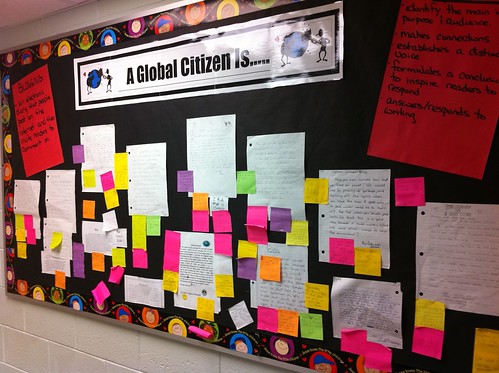
Earlier this week, I had a chance to visit a school in my district, where they found a unique way to introduce blogging to junior and intermediate aged students.


While the entire school was exploring the theme 'Global Citizenship', student writing on the topic was posted for a public audience. Traditionally, student writing is read by an audience of one (the teacher); but these students had their writing posted on a hallway bulletin board... with a twist.

With sticky notes available nearby, visitors to the display were encouraged to comment publicly on student work. Commenters could see threads developing, and the original authors were able to engage in discussion with a real world audience. The ideas of the authors were considered, challenged, and celebrated in a highly interactive way.

By engaging an impermanent tool, students and teachers were able to explore many e-writing concepts. Students learned about: why authors might want to filter comments; how to deal with anonymous comments; and when it might be appropriate to reference and link to the writing of others. Most valuable of all, they discovered the benefits and challenges of being an involved member of a learning community.

Relatedly, this project led me to consider what might happen if students were required to post 'Facebook-style' poster pages in public places. Even though some students might be shy to share personal photos, or suggestive comments on a school wall, it would reinforce the lesson that such posts on the Internet are commonly accessible to a much broader audience.

Are you aware of similar paper-based strategies that can be used to teach students skills that are transferable to the Read-Write Web?

Photo Credit: Rodd Lucier

Tuesday, March 1, 2011

UnPlug'd: A Canadian Education Summit

Going to the 'edge', and taking the leap to try something that's never been done before, can be both intimidating and energizing at the same time. Taking such a risk with friends is one way to give yourself the guts to attempt even the most challenging of endeavors. I count myself lucky to work with colleagues who share a common dream; one that will breathe life into a potentially transformative teaching and learning experience.

In August of 2010, I found myself immersed in the natural setting of the aptly named Northern Edge Algonquin, a retreat centre near South River, Ontario, and I asked myself:

"What would happen if we could gather together innovative educators who were used to 'learning out loud'? How might Canadian thought leaders interact in a face-to-face environment? What might such teacher-learners create while immersed in a natural setting, 'unplugged' from the online world?"


When the questions refused to fade upon my return home, I made phone calls to a few kindred spirits I'd come to know and trust. After conversations with Zoe and Ben, I sketched out a plan for a meeting that would include Alec and Dean, two distant Canadian colleagues whose vision for collaboration and sharing are well known. And now, six months after our initial meeting, our team includes Tom, Darren and Bill, and we've gone public with "UnPlug'd", the first grass roots Canadian education summit.

UnPlug’d will take place this summer, bringing 40 leaders from classrooms across Canada, to the remote retreat setting of Northern Edge Algonquin. At a carefully orchestrated 3 day summit, teacher-learners will share their most compelling stories, and will refine a shared vision about what really matters most in K-12 education in Canada. In the wake of the summit, we will capture and share our collective wisdom in a mixed media publication: "Why _______ Matters".


Will the thin electronic ties among delegates be thickened through face-to-face familiarity? Will we be able to collectively re-imagine what it means to be a teacher? Can a Positive Deviance approach to social change, lead the transformation of education?

Regardless of the outcome, a number of Canadian educators who are already re-inventing education, are going to have some wonderful stories to tell. In fact, it's a story Ben and Zoe have already begun to tell.

Photo Credit: Rodd Lucier (taken at Northern Edge Algonquin)