Showing posts with label google. Show all posts

Tuesday, December 15, 2009

A Google Renaissance

There have been so many innovations announced by Google in recent weeks, that intermittent visitors to the search site are sure to be surprised. While new developments are routinely posted at the official Google Blog, with supporting videos at the Google Channel on YouTube, today's podcast is my attempt to put many of the most recent developments into context.


Is individualized search a good thing? See what Google suggests when you type the word 'Renaissance'...


And just in case you missed Google Goggles and the changes in store for mobile devices:

Monday, December 7, 2009

You Are What You Search: Part 2

You may now be the results of someone else's search!

It's been many months now that I've had the benefit of social search embedded in my Google searches. Courtesy of a Firefox plugin, I'm used to seeing this:

Picture 264
Uploaded with plasq's Skitch!

Now, each of us will have access to breaking news and random information that the masses are posting to Twitter, Jaiku, Facebook, Identi.ca, and much as Google announces the roll-out of Real Time Search.


Will the personalized aspects of Google's search, allow me to specify the mining of tweets and posts from my Collaborative Learning Network?
Will anyone step in to archive today's zeitgeist?
How long will it be until marketers learn to manage this live search mechanism?

Saturday, December 5, 2009

You Are What You Search: Part 1

As the web continues to evolve, it is becoming more and more common for search tools to offer a personalized experience to the end user. In my next few posts, I'd like to explore some of the emerging trends that are destined to impact in the ways we explore on the World Wide Web.

What's the Motivation?
A few years ago, I was intrigued by the introduction of A9.com, a search engine hosted by Amazon, that promised to save a history of anyone's searches. My initial thought was that such information might be useful in an archeological sense, allowing future generations to see what held our interest at a given time. Dose of Reality: A9 search data was collated with each user's Amazon account.

A-9 has since moved on to new search strategies, including the acquisition of SnapTell, a mobile app that identifies CDs, books, DVDs, and videogames based on cover photos. Dose of Reality: Amazon sells CDs, books, DVDs and videogames.

In Whose Best Interest?

It's now been confirmed by SearchEngineLand, that Google has been personalizing search results for me, based on my past searches and click-throughs, but my search engine of choice actually knows much more about me than that. Consider the data that Google has collected through your use of Google Apps by visiting your personal Google Dashboard.


Although the potential for archived search histories was known to me, it was a bit of an awakening today, to come across my personal Google Web History. If you have a Google account, you've been presented with Terms of Service, and have granted permission for Google to use what you submit, post or display (11.1). If you're concerned about the security of this data, the Google Privacy Centre might allay your fears.

What does the Future Hold?
Whether or not Amazon and Google follow parallel or intersecting paths, these two giants play key roles in Epic 2015 an visionary piece (now almost 5 years old) that extrapolates current trends.


Google and Amazon each offer some terrific 'Free' tools, but maybe it's high time we consder the price we're really paying?

Saturday, October 3, 2009

Google Wave on the Back-of-a-Napkin

The real challenge of today's World Wide Web, is to condense any idea into a nugget that can be digested by a diverse audience, in very short order. Rather than calling for a 5000 word essay as an explanation, the attention span of today's networked audience demands that that even the most complex idea be distilled into a back-of-the-napkin presentation.

Now that Google Wave is in limited release, this 2 minute explanation is rising the charts as the most efficient way to explain what may soon become E-mail 2.0.


Whether or not Google Wave changes the way we collaborate online, this presentation by Epipheo Studios, serves to remind teachers and students that there is a real art to explaining concepts for today's attention deficit world.

Sunday, May 31, 2009

What's in a Name?

Having a catchy name to wrap an innovation around is a great way to create buzz. With announcements by Microsoft and Google heralding game-changing services, I couldn't help but consider the names chosen.

Microsoft is getting back into the search game with BING, while Google is considering how to consolidate the social nature of communication with WAVE. I suspect that you will be as surprised as I was in discovering the most common definitions for each of these words. To consolidate what I found, I ran the results through Wordle.


Definitions of BING on the Web:

Bing is a surname.
en.wikipedia.org/wiki/Bing_(surname)

Bing is a Unix program which is essentially a ping with added network throughput measurements.
en.wikipedia.org/wiki/Bing_(program)

Bing or Gebrüder Bing was a German toy company founded in 1863 in Nuremberg, Germany by two brothers, Ignaz and Adolf Bing, originally producing metal kitchen utensils. They began toy production in 1880, their first teddy bears in 1907 . ...
en.wikipedia.org/wiki/Bing_(company)

A slag heap (also called bing, Boney piles, culm, waste coal, Terekons (Russian), gob piles, or slate dumps) is a pile built of accumulated tailings, which are by-products of mining. ...
en.wikipedia.org/wiki/Bing_(mining)

Bing is a soft drink produced by the Silver Spring Mineral Water Company Limited, based in Folkestone, Kent, UK. It is dark orange in colour and has a cherryade quality to it. The flavor has been compared by some to original Tizer(before they removed the artificial flavourings). ...
en.wikipedia.org/wiki/Bing_(soft_drink)

Bing is a Chinese term used to describe dough-based Chinese flatbreads, pancakes, unleavened dough foods, or indeed any food item with a flat disk ...
en.wikipedia.org/wiki/Bing_(Chinese_flatbread)

The Twin Bing is a candy bar made by the Palmer Candy Company of Sioux City, Iowa. It consists of two round, chewy, cherry-flavored nougats coated with a mixture of chopped peanuts and chocolate.
en.wikipedia.org/wiki/Bing_(candy)

Bing is a slang term for solitary confinement in prison. Also: a heap or pile, such as a slag heap
en.wiktionary.org/wiki/bing

Bing is an annoying lizard in "The Angry Beavers", an animated television series.
www.absoluteastronomy.com/topics/The_Angry_Beavers

Bing - In Feng Shui, One of ten heavenly stems... the sign of growth like fire in the house.
www.noblestarfengshui.com/glossary.html

Bing is, with Shark, one of the original founders of RPG World. He runs the server's day-to-day operations and oversees the rest of the ...
encyclopedia.wizards.pro/index.php/RPG_World


Definitions of WAVE on the Web:

* one of a series of ridges that moves across the surface of a liquid (especially across a large body of water)
* a movement like that of a sudden occurrence or increase in a specified phenomenon; "a wave of settlers"; "troops advancing in waves"
* (physics) a movement up and down or back and forth
* something that rises rapidly; "a wave of emotion swept over him"; "there was a sudden wave of buying before the market closed"; "a wave of conservatism in the country led by the hard right"
* beckon: signal with the hands or nod; "She waved to her friends"; "He waved his hand hospitably"
* the act of signaling by a movement of the hand
* brandish: move or swing back and forth; "She waved her gun"
* a hairdo that creates undulations in the hair
* roll: move in a wavy pattern or with a rising and falling motion; "The curtains undulated"; "the waves rolled towards the beach"
* an undulating curve
* curl: twist or roll into coils or ringlets; "curl my hair, please"
* a persistent and widespread unusual weather condition (especially of unusual temperatures); "a heat wave"
* set waves in; "she asked the hairdresser to wave her hair"
* a member of the women's reserve of the United States Navy; originally organized during World War II but now no longer a separate branch
wordnet.princeton.edu/perl/webwn

* The wave (British English: Mexican wave; also stadium wave), is achieved in a packed stadium when successive groups of spectators briefly stand ...
en.wikipedia.org/wiki/Wave_(crowd_action)

Friday, April 3, 2009

Stories of Co-Design

Students and teachers alike, can learn plenty from the way today's technology leaders work collaboratively in designing solutions to our communications problems.

If you're like me, you've likely discovered that initiatives undertaken with peer support, that are developed with the cooperation of supervisory staff, tend to be the most successful. Similar ideas, pursued by lone individuals, struggle in contention for attention and funding.

In The Story of Co-Design, the potential of collaborative problem solving is engaged in order to meet the needs of the inhabitants of Panda Island. The metaphor can work for identifying the needs of a school community, a provincial ministry of education, or a network of users on the World Wide Web.


The Story of Co-Design from thinkpublic on Vimeo.

If you think you have a great idea, take heed of today's technology leaders, and engage others in collaborative planning & development:

1] Facebook Connect is allowing bloggers on various platforms, to build community by leveraging existing community of Facebook.

2] G-Mail now has a Twitter widget that allows users to access tweets alongside their inboxes.

3] TweetDeck, my choice for accessing Twitter feeds, is now working with Facebook, to refine an interface that allows cross-posting to both sites.

4] Twitter encourages developers to mash-up feeds in the deployment of a wide range of tools.

5] Beyond embedding Google's search technology in the address bar, Firefox engages developers on many levels to add value to their web browser through plugins.

With TechCrunch reporting that Google is in Talks to Acquire Twitter, I'm just happy to know that they're on good speaking terms. Besides the fact that our future communications habits may well depend on how nicely they play together, we can learn a lot by the way today's technology leaders work in co-designing our future.
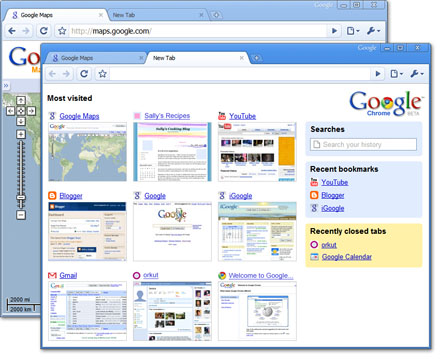
Photo Credit: Jason Nicholls

Friday, December 5, 2008

Social Networking Outside of the Walled Garden

Social Networking is about to take a giant leap from behind many walled gardens, and will be able to bring a sense of community to just about any site. By pasting some simple free code, your blog, wiki, or other site page, can now host a community, thanks to Google Friend Connect.

If you haven't already done so as a Google account user, you may soon be customizing a Google Profile that can travel with you from site to site, and from community to community. The significant difference between this profile and those of social networking sites, is that your Google Profile is public, and if Todd Lucier is correct, may become your digital 'business card'.

These profiles can now be leveraged by a developing range of social gadgets that are being written and shared freely on the very public world wide web.


I've just added a Friend Connect widget to the lower left corner of this blog. (In doing so, I was shocked to find dozens of new widgets in the Blogger menu!) If you visit here regularly, feel free to add yourself, and soon you may meet other clever sheep who share similar interests in educational technology... and continuous change!

Tuesday, September 2, 2008

Chrome Comes to Life

It's Here! Google Chrome and it's companion open source code page, Chromium, are now available in beta form for PC users. Highlights include: ready access to the sites you visit most often; an intuitive search/address bar called 'omnibox'; and a minimalist package worthy of Google's heritage.

Here are my first impressions, including a quick comparison to Firefox, Safari, and Flock (6 minutes).


I'm guessing that Chrome will soon be a key component of Android and the Google Phone, and while it's not earth-shaking enough to get me to run Microsoft Windows, I'll be downloading the Mac version when it's ready for prime time.

Monday, September 1, 2008

Google Gets into the Browser Game

It makes perfect sense. For years, Google has been the search tool of popular choice, so why shouldn't they be in the browser business? The news on the Official Google blog says they will be joining the game with "A Fresh Take on the Browser".


The launch of Google Chrome promises to create an era of fresh thinking in response to the realities of Web 2.0. Even with tabbed browsing, most browsers run on engines created to take advantage of one web resource at a time. Google intends it's browser to be capable of multi-tasking, while handling the full range of evolving web applications.

Google's own comic book explanation clearly outlines the goals of the project, but I prefer the crisper version posted by Blogoscoped.com.

The beta release of Google Chrome is intended exclusively for MS Windows, but versions for Mac and Linux are promised. My fingers are crossed in the hope that Google Chrome will get us on track to use the browser as a powerful app, rather than a simple window to the web.

Late addition: Live Blog of the press conference/demo/launch says the code for this browser will be very open. If you're into that sort of thing, visit Chromium.

Later addition: It's available now! http://www.google.com/chrome


Image Credit: The comic book is shared by Google via Creative Commons attribution, non-commercial, no derivative works 2.0 creative commons license

Saturday, July 19, 2008

Teaching Them to Teach Themselves

By now most people are very familiar with the way that metadata tags are "Teaching the Machine". What is less commonly understood, is how tags can be leveraged to engage students in "Teaching Themselves".


Assuming that a teacher can create a unique identifier for a class or course (i.e., Lucier_physics_2008 or LucierSPH08-unit5), there are many ways to engage your students in the gathering of teaching and learning resources.

1] Invite students to post and tag Flickr images that match with concepts taught in class. Students might also add comments to existing photos.

2] Encourage students to share bookmarks on Delicious, Diigo or Furl. Link to videos, blog posts, photos, songs...

3] Promote the use of reflective journals in the form of blog entries that use the course identifier as a keyword or tag.

4] Add comments to blog posts that include your course identifier. While linking to rich thinking, you can model how learners might participate in educational dialogue within the blogosphere.

5] Demonstrate how comments can be added to YouTube or TeacherTube videos. "This video would be great for my LucierSPH08 course!"

6] Set up a Custom Search Engine to search specific sites for course-matching content. Tag the best of the best with your course/class code.

7] Add custom sections to a personalized news page. Consider simplifying the process by sending the RSS feed to Google Reader or another aggregator.

8] Demonstrate how to search blog entries for topical materials. Send custom searches to your feed aggregator for filtering.

9] Tag selected educational and current events podcasts. Many post-secondary institutions like Berkeley, Stanford, Yale, Penn State, Texas A&M, Duke, Queens, MIT offer access to lectures and other content. Consider subscribing to a few of the many terrific free podcasts available on iTunes. Shameless plug: Have you heard the Teacher 2.0 Podcast?

10] The advanced step: Set up live feeds to various content sources by aggregating tagged content to a community location by using a tool like PageFlakes or iGoogle.

Before launching such a social learning project with students, be sure to demonstrate the power of resource sharing by pre-tagging numerous resources specific to your course. A live demo using your course keyword should go a ways towards whetting the appetite of your students.

Who knows, by opening this conversation about sharing, you might even learn a few search tricks from your students! The video below by Jimmy Ruska, demonstrates what some students already know about effective searches for complimentary material, be it for music or university textbook content.


Photo Credit: Maureen Flynn-Burhoe

Wednesday, July 9, 2008

Google Goes Lively

Will Lively rival Second Life? Thanks no doubt to effective use of the 20% creative project time, Google has launched a virtual world... at least for those on the PC platform (Vista/XP; Explorer/Firefox).


The room library appears to be a popularity contest akin to YouTube... and the catalogue shows there is the possibility for a functional economy in this space. What other wrinkles are hidden here?

Monday, May 19, 2008

Create a Custom Search Engine

I have the feeling that educators will find many uses for Google's 'free' Custom Search Engine tool. Here are but a few ideas:

1] Have Google index the content of PDF, RTF, or DOC files by placing these in a web folder; and create a custom search that is limited to this folder;

2] Provide students access to a search engine set to scour specific resources that you update for specific grades/subjects/projects (e.g., general Craig Nansen's K-12 resources)

3] Add a custom search engine to your blog, wiki, or podcast page.


Do you have any other ideas?

Sunday, May 11, 2008

Take Ownership of Your Identity

Who Are You?

Let me qualify that... Who are you to someone who Googles you? Educators may not realize this, but most of us have likely been Googled by students, parents or other educators!

In many ways, your participation in discussions within the blogosphere, and your presence on social networks, comprise your personal/professional portfolio. Recent posts by Doug Peterson and Tim Hawes have recently reinforced for me what I've been recommending for teachers for a few years now: "You need to have an online presence!"

Last week, the Globe and Mail reported that a Manitoba high school student was charged with 'impersonating his teacher' after he "allegedly set up a Facebook profile in the teacher's name, complete with a photo and biographical details."

Even though impersonation contravenes Facebook's terms of use' in which users agree NOT to "impersonate any person or entity, or falsely state or otherwise misrepresent yourself, your age or your affiliation with any person or entity;", this type of activity is surely taking place within thousands of profiles.

What's a teacher to do?
Be proactive! Take ownership of your identity!

1] Google yourself on occasion, to see what your online resume currently consists of. (You might also consider Googling your children or others who are close to you...)

2] If you don't have a Facebook account, get one! You don't need to use it, but include enough information in your profile to ensure that you are the 'real one'. You might also want to register with other popular social networks.

3] Consider buying a personalized domain name. You don't have to use it, but if you have a domain that is www.firstname-lastname.com, you are ensuring that on one else takes your online identity. Who knows, it might even spur you towards creating a real 'online portfolio'. Getting a domain name is easy and inexpensive, and can do great things towards enhancing your online presence. If you're interested, check out godaddy.com, buydomains.com, planetdomain.ca, Yahoo domains, sibername.com or another service.

4] Develop a personal website. Start small by having a personal web page that you can use to post resources or ideas. A wiki page (at a such such as Wetpaint); or a personal blog (at a site like Blogger.com) can be very easy to set up and to update. You need not know HTML or complex coding, and you can easily redirect your domain name (see #3 above) to this personal page.

5] Demonstrate your professionalism to parents who may 'look you up online', by participating in meaningful professional discussions. To do so, you can either make regular posts on your own blog, or you can comment on the blogs of others in the edu-blogosphere. Note that anything you post to a blog will come up in a web search, provided you use your real name on such a post.


Photo Credit: Steve Mishos

Thursday, April 24, 2008

5 Visual Search Tools + 1

The Web has been text oriented for so long, that many may not realize that it can be searched visually. Google's efficiency in search is due in large part to the fact its menu is simple, and almost exclusively text-based. Can searches that rely on eye-candy compete? You be the judge.

1] Search Me: A graphical search that emulates the Apple scrolling image interface, complete with reflections. Are the results more relevant? This site makes the claim.

2] Boolify: A graphical representation of the boolean search. This could be a good tool for teaching simple search skills.

3] Viewzi: Although I'm not crazy about their expanatory video that borrows it's format from CommonCraft, this viewable search allows you to select a page style based on the content you're after.

4] Kartoo: Using this search engine is an interactive experience. Hovering on search results leads you to refine your search by highlighting relationships among results with links and keywords.

5] ManagedQ: Screenshot previews allow the visually oriented to quickly locate relevant search results from a menu of pages.

The extra visual search tool I'd like to share, is Quintura, uses interactive 'keyword clouds' to help users narrow their search. As a bonus, this search tool can be embedded on your site. Try it out by hovering on a keyword below...

Thursday, March 27, 2008

MI and Google Tools

There are so many tools available from Google, that you can make recommendations based on the Theory of Multiple Intelligences:


Linguistic: Blogger; Google Documents; Google Page Creator; Google Reader; Google Book Search; Google News; Google Language Tools; Google Translate; Hello; Gmail; Google Scholar;

Mathematical-Logical: Google Spreadsheets; Google Analytics; Google SMS; Google Sets; Google Desktop; iGoogle; Feedburner; Android; Open Social; Google Transit; Google Patents; Google Product Search; Google Zeitgeist;

Visual Spatial: Google Sketchup; Google Page Creator; Picasa, Google Page Creator; YouTube; Google Video; Google Maps; Google Ride Finder; Google Image Search; Google Image Labeler; Google Patents;

Kinesthetic: Google Video; YouTube; Dodgeball; Google Image Labeler; Google 411;

Musical: Google Reader (RSS & podcasts); Google Podcast Directory; Google Talk;

Intrapersonal: Blogger; Google Notebook; Google Calendar; iGoogle; Google Transit; Google Image Labeler; Google Product Search;

Interpersonal: Google Talk; Google Documents; Google Groups; Google Team; Google Sites; Orkut; Google Trends; Google News; Hello; Dodgeball; Gmail; Open Social; Google Zeitgeist;

Naturalist: Google Maps; Google Earth; Google Mars; Google Moon; Google Sky;

I've heard Howard Gardner say "...there are likely thousands of intelligences." If that is true, maybe one yet to be identified is "The Googlist"!

Late addition: I'm reminded by Clarence Fisher at Remote Access, that Google employees are rumoured to work on creative independent projects for 20% of their work week. Knowing that this is how Google labs has developed many of the tools listed above, I'm drawn to follow Clarence's query: How much 'Google Time' can we provide students, and what might be the result?

More on this topic is available on the Teacher 2.0 Podcast: Google on the Dark Side

Thursday, February 21, 2008

My Virtual Health

Even as flash drives with increasing capacities are becoming ubiquitous, it's obvious to me that files, photos, contacts and even ideas are gravitating more and more to web servers in lieu of local hard disk drives. Is a remote computer the best place to store our personal information?

When it comes to photos and videos, more and more folks seem pretty comfortable with services like Flickr and YouTube;
When it comes to email, the majority of users seem content with Gmail and other web-based email;
When it comes to banking information, a great number of adults are comfortable with online banking, and with the sharing of digital data to make online purchases;
When it comes to health information, we may very soon be asked to consider consolidating our health records with Google Health!

The New York Times story about the behind-the-scenes development of Google Health, has me considering a number of questions related to the collection and remote safe-keeping of such data:

My pharmacy already maintains my personal prescription data... How secure is this information? Will my doctor and the hospitals I visit in the future save time in learning about me? Can accurate online data make my life easier? What might be the ramifications of errors in the recording of data? Will my email account soon be home to ads for a customized selection of medications?
Are we moving closer to the day when all personal information will be centralized? Will computers such as cell phones and other palm technologies become the tools we use to access global computers? Will legal battles be fought to maintain the privacy of such information?

It seems to me that any one tool that efficiently manages my email; my web content; my personal media; my banking information; my health information; my personal feeds; my entertainment... will be guaranteed long term access to my eyes and the eyes of my family members.

Should we be worried about the hosting of all this personal information online? I'm not sure, but it seems that we've become more and more comfortable with someone else storing and securing an expanding range of our personal information. The potential uses/misuses of this information are due some careful consideration.

Why it should matter to educators is discussed on the Teacher 2.0 podcast...

Saturday, December 22, 2007

Google Holiday Map


The Google Blog has just posted a radical idea for bringing the world together in a compelling way over the next week or so. My Maps are Our Maps invites people to post stories, traditions and more in the form of photographs embedded into a Google Map. (Photos, or YouTube videos can be embedded; but content must be present on the World Wide Web prior to adding it to a Google map.)

The entry includes a link to a Google Map user guide. It will be very interesting to see how this map develops as the personal stories of global celebrations of Christmas, Chanukah and the New Year are added. This is one terrific example of Digital Storytelling!

If only educators had known about this before the end of school for the holiday break...? Certainly there are other classroom and community applications for such a project. It is an engaging idea that can be scaled from classroom, to school, to community, to city, to state/province, to country, to the global community. I'm guessing we'll soon see more than few educational adaptations of this idea... A few of my own ideas are on today's Teacher 2.0 Podcast.

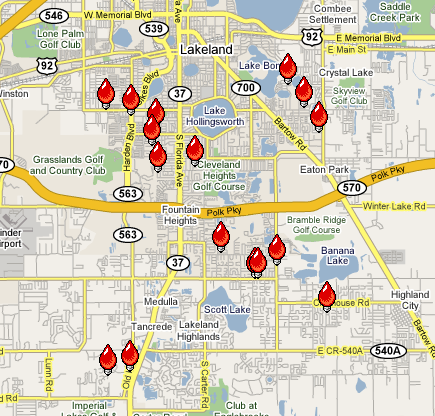
Found one! A local holiday Christmas lights map! This map highlights outstanding light displays in Lakeland Florida, spring home of the Detroit Tigers:

Tuesday, December 18, 2007

Google... Now More than a Verb!


Everyone knows that Google is "The Search Engine that Became a Verb", but relatively few people are aware of the steps Google has taken to become a Webware company. Educators who have yet to discover the value of the Read/Write Web, need to become aware of Google's Tools. (That sounds funnier than I intended...) You may have heard of Blogger, YouTube, Google Maps and more, but have you actually used them. Google Documents is less well-known, but it has powerful literacy connections.

In today's Teacher 2.0 podcast-mini, I've highlighted one of these tools: Google Documents. But before educators can make effective use of these tools, they have to see their usefulness in their own work. Will Richardson's summer commentary hit the mark: "I’ve been trying of late to convince folks that until they understand the uses of these tools in their own learning practice they’ll be really hard pressed to deliver the different pedagogies that go along with them in compelling and effective ways."

In short, Google Documents is an online word processor that allows for the creation of documents (and spreadsheets, and slideshow presentations) that can be edited collaboratively. Google Docs tracks all changes to a given document over time, so a teacher can browse all draft versions of a document highlighting any one person's contributions. This is doable with paper and pen, but now it's a new RSS: Really Simple Supervision!

But wait... There's More!
Google documents also provides 'one click publishing'. This is the simplest way I know of, to publish any 'document' online. Your students can have global audiences for their written work if you can find a way to share the links to their work. Any document can be posted to the web. For an overview of how simple it is to do this publishing, view this really short tutorial (What can I say, it's simple!).


Search Skills are still needed! Even though these new tools are being harnessed by new users every day, there are many, many teachers who have yet to master basic online search skills. If educators knew that they could limit their searches to PowerPoint files; or PDF files (colouring pages anyone); or today's news articles... they'd feel empowered to use the web, and would truly be able to Google for Gold.

It's still just a constantly growing sea of information for too many... Little do we realize how this information is 'self-organizing' itself to be the a 'thinking machine'. If you have yet to see Robin Sloan and Matt Thomson's future vision: Epic 2015, this would be a good time!

Maybe the day will come when a user will identify him/herself as a student or teacher, and Google will intuitively provide the most relevant search results. Some search engines already provide personalized responses... but that's another story!